4.1 REST API
4.1.1 Batches
4.1.1.1 [GET] Get Batch List
GET /batches
Loads the available packages from the registry as a paginated list. Addresses directly to the validator.
# |
Query Parameter |
Type |
Description |
Required? |
|---|---|---|---|---|
1 |
head |
string |
Block header index or ID |
|
2 |
start |
start |
ID from which the download starts |
|
3 |
limit |
integer |
Number of packages returned |
|
4 |
reverse |
string |
An option to present an inverted result (in reverse order) |
Executing can return the following codes:
# |
Status Code |
Value |
Description |
|---|---|---|---|
1 |
200 |
OK |
Package list received successfully |
2 |
400 |
Bad Request |
The request was formulated incorrectly |
3 |
429 |
Too Many Request |
The number of requests is too high |
4 |
500 |
Internal Server Error |
Validator issues |
5 |
503 |
Service Unavailable |
API cannot reach validator (internal network issues) |
Example:
curl -v http://192.168.1.53:8108/batches
4.1.1.2 [GET] Get Information about the batch
GET /batches/{batch_id}
The call receives a particular batch, including its structure, transactions, and headers.
# |
Query Parameter |
Type |
Description |
Required? |
|---|---|---|---|---|
1 |
batch_id |
string |
Index or block header ID |
YES |
Executing can return the following codes:
# |
Status Code |
Value |
Description |
|---|---|---|---|
1 |
200 |
OK |
Received a response with the package information |
2 |
400 |
Bad Request |
The request was incorrectly formulated |
3 |
404 |
Not Found |
Address of ID not found |
4 |
500 |
Internal Server Error |
Validator Issues |
5 |
503 |
Service Unavailable |
API cannot reach the validator (internal network issues) |
Example:
curl -v http://192.168.1.53:8108/batches/ 30450220266058602df798266f2287a18863443ca834005c3252c04bbf143b3d0f9b8be8022100e4dfab413096639a2f9d11a98763293b9e838c1b3ba562bfc416769eeda31830
4.1.1.3 [POST] Send Batch List to Insert into Ledger
POST /batches
This call is entirely responsible for creating new transactions. To speed up processing, transactions are always included in a batch, which is transmitted to the server (validator). Following Sawtooth, the DGT solution implemented different types / families of transactions (processed by different processors) and contain binary data - the payload. Thus, transactions require special pre-processing that controls their format and content. Each batch includes one or more transactions. The input of this call is a protobuf-edited list of packages in the form of an octet-stream binary file.
The API immediately returns a response in the form of a link/receipt attached by the /batch_statuses call. Packets are processed and the client must independently check their status after awhile.
Executing can return the following codes:
# |
Status Code |
Value |
Description |
|---|---|---|---|
1 |
202 |
Accepted |
Packages submitted for validation, but not yet accepted by consensus |
2 |
400 |
Bad Request |
The request was incorrectly formulated |
3 |
429 |
Too Many Request |
There are too many requests |
4 |
500 |
Internal Server Error |
Validator Issues |
5 |
503 |
Service Unavailable |
API cannot reach the validator (internal network issues) |
Warning
It is not recommended to use this API without the support of the SDK or libraries due to the significant logic involved in the formation of transactions and packages. You can also use the API of specific families to send transactions of a certain type (see below).
4.1.1.4 [GET] Get Batch Status
GET /batch_statuses
The network operates asynchronously, therefore transactions that were packaged and sent may not necessarily be accepted by the network. Therefore, the packet status response is returned asynchronously by a special call. There are 4 possible statuses that take certain string values:
COMMITED - the batch is received by the network and the information is entered into the registry.
INVALID - the batch is rejected or incorrectly formed.
PENDING - the package is awaiting verification or is in the process of validation.
UNKNOW - uncertain state (for example, due to network malfunction).
If a timeout is specified as a parameter, then the APIs will wait for a response until the given time expires or all packages declared in the ID are committed. The request takes the following parameters:
# |
Query Parameter |
Type |
Description |
Required? |
|---|---|---|---|---|
1 |
id |
string |
Single package ID or comma delimited list |
YES |
2 |
wait |
integer |
Time in seconds to wait for a commit |
As a result of execution, the following codes may be returned:
# |
Status Code |
Value |
Description |
|---|---|---|---|
1 |
200 |
OK |
All statuses received |
2 |
400 |
Bad Request |
The request was incorrectly formulated |
3 |
500 |
Internal Server Error |
Validator Issues |
4 |
503 |
Service Unavailable |
API cannot reach the validator (internal network issues) |
Example:
curl -v http://192.168.1.53:8108/batch_statuses?id=30450220479b7225cc435bd90357ddfd212cd733ec80b3b0c331073403211b8ab55ad05e022100ea8c4112ffbbf1402f3a51b9feb3974d5cba1250c088c36705f550bfec510c9e
4.1.1.5 [POST] Get batch statuses via JSON
When receiving the package commitment status and if in need to use a request as a JSON parameter, like 4.1.1.4 but as a POST request, you can use the API:
POST /batch_statuses
This format is preferable for checking many identifiers (more than 15).
# |
Query Parameter |
Type |
Description |
Required? |
|---|---|---|---|---|
1 |
wait |
integer |
Time in seconds to wait for a commit |
Executing the query can return the following codes:
# |
Status Code |
Value |
Description |
|---|---|---|---|
1 |
200 |
OK |
All statuses received |
2 |
400 |
Bad Request |
The request was incorrectly formulated |
3 |
500 |
Internal Server Error |
Validator Issues |
4 |
503 |
Service Unavailable |
API cannot reach the validator (internal network issues) |
4.1.2 State
4.1.2.1 [GET] Fetch the state
GET/state
When this query is executed, the registry is displayed (perhaps, starting from some record) that is paginated relative to a given block.
# |
Query Parameter |
Type |
Description |
Required? |
|---|---|---|---|---|
1 |
head |
string |
Index or ID of the first block |
|
2 |
address |
integer |
Partial address to filter - must contain an even number of hexadecimal characters |
|
3 |
start |
string |
ID to start paging |
|
4 |
limit |
integer |
Number of items to return |
|
5 |
reverse |
string |
An indicator that the list should be specified in reverse order |
Executing the query can return the following codes:
# |
Status Code |
Value |
Description |
|---|---|---|---|
1 |
200 |
OK |
Necessary data received |
2 |
400 |
Bad Request |
The request was incorrectly formulated |
3 |
500 |
Internal Server Error |
Validator Issues |
4 |
503 |
Service Unavailable |
API cannot reach the validator (internal network issues) |
Example:
curl -v http://192.168.1.53:8108/state?limit=100&address=00000034c8768f9d68b36cda2f073e06f78938e3b0c44298fc
4.1.2.2 [GET] Get the definite leaf from the current state
GET /state/{address}
This query is used to get a specific list of a Merkle tree at the given Radix address (full 70-digit address).
# |
Query Parameter |
Type |
Description |
Required? |
|---|---|---|---|---|
1 |
address |
string |
List’s Radix-address |
YES |
2 |
head |
string |
Block index or ID |
Executing the query can return the following codes:
# |
Status Code |
Value |
Description |
|---|---|---|---|
1 |
200 |
OK |
Necessary data received |
2 |
400 |
Bad Request |
The request was incorrectly formulated |
3 |
500 |
Internal Server Error |
Validator Issues |
4 |
503 |
Service Unavailable |
API cannot reach the validator (internal network issues) |
Example:
curl -v http://192.168.1.53:8108/state/00000034c8768f9d68b36c758d61f26a444483efe899c74558f20be3b0c44298fc1c14
4.1.3 Blocks
4.1.3.1 [GET] Block List
GET /blocks
This call makes it possible to get the list of blocks stored in the registry of the given node.
# |
Query Parameter |
Type |
Description |
Required? |
|---|---|---|---|---|
1 |
head |
string |
Index or ID of a given block from which the list is displayed |
|
2 |
start |
string |
Index or ID of the block from which the output page begins |
|
3 |
limit |
integer |
Number of records shown |
|
4 |
reverse |
string |
Indicates whether the list should be shown in reverse order |
Executing the query can return the following codes:
# |
Status Code |
Value |
Description |
|---|---|---|---|
1 |
200 |
OK |
Necessary data received |
2 |
400 |
Bad Request |
The request was incorrectly formulated |
3 |
500 |
Internal Server Error |
Validator Issues |
4 |
503 |
Service Unavailable |
API cannot reach the validator (internal network issues) |
Example:
curl -v http://192.168.1.53:8108/blocks?start=0x0000000000000000&limit=100&reverse
4.1.3.2 [GET] Get the specific block
GET /blocks/{block_id}
This call is for getting a specific block. Call options:
# |
Query Parameter |
Type |
Description |
Required? |
|---|---|---|---|---|
1 |
block_id |
string |
Index or ID of a given block |
YES |
Executing the query can return the following codes:
# |
Status Code |
Value |
Description |
|---|---|---|---|
1 |
200 |
OK |
Necessary data received |
2 |
400 |
Bad Request |
The request was incorrectly formulated |
3 |
500 |
Internal Server Error |
Validator Issues |
4 |
503 |
Service Unavailable |
API cannot reach the validator (internal network issues) |
Example:
curl -v http://192.168.1.53:8108/blocks/3046022100dd31cf1777a47d8941a0a426af9be95f63ba75b099eaee33696d95775578b7ba022100e1922519abd2ed170e0e62c9668dc140d17538617fedbe08352604f877b85f1d
4.1.4 Transactions
4.1.4.1 [GET] Transaction List
GET /transactions
This call returns a list of transactions divided into pages:
# |
Query Parameter |
Type |
Description |
Required? |
|---|---|---|---|---|
1 |
head |
string |
Index or ID of a given block from which the list is displayed |
|
2 |
start |
string |
Index or ID of the block from which the output page begins |
|
3 |
limit |
integer |
Number of records shown |
|
4 |
reverse |
string |
Indicates whether the list should be shown in reverse order |
Executing the query can return the following codes:
# |
Status Code |
Value |
Description |
|---|---|---|---|
1 |
200 |
OK |
Necessary data received |
2 |
400 |
Bad Request |
The request was incorrectly formulated |
3 |
500 |
Internal Server Error |
Validator Issues |
4 |
503 |
Service Unavailable |
API cannot reach the validator (internal network issues) |
Example:
curl -v http://192.168.1.53:8108/transactions?limit=1000
4.1.4.2 [GET] Get a specific transaction
GET /transactions/{transaction_id}
This method returns information on a specific transaction.
# |
Query Parameter |
Type |
Description |
Required? |
|---|---|---|---|---|
1 |
transaction_id |
string |
Index or ID of a given transaction |
YES |
Executing the query can return the following codes:
# |
Status Code |
Value |
Description |
|---|---|---|---|
1 |
200 |
OK |
Necessary data received |
2 |
400 |
Bad Request |
The request was incorrectly formulated |
3 |
500 |
Internal Server Error |
Validator Issues |
4 |
503 |
Service Unavailable |
API cannot reach the validator (internal network issues) |
Example:
curl -v http://192.168.1.53:8108/transactions/304402204ee83139cb7e5407486d7a238634e9f436f41f0c96de409a23f3e62b2798edc102200679631ac3dcefcccd10e0d12bda695f1419a8104ffd9ae9691e833992c93aeb
4.1.5 Receipts
4.1.5.1 [GET] Receipt List
GET /receipts
This method returns receipts for one or more transactions:
# |
Query Parameter |
Type |
Description |
Required? |
|---|---|---|---|---|
1 |
id |
string |
Index or ID of the transaction for which the receipt is generated |
YES |
Executing the query can return the following codes:
# |
Status Code |
Value |
Description |
|---|---|---|---|
1 |
200 |
OK |
Necessary data received |
2 |
400 |
Bad Request |
The request was incorrectly formulated |
3 |
500 |
Internal Server Error |
Validator Issues |
4 |
503 |
Service Unavailable |
API cannot reach the validator (internal network issues) |
Example:
curl -v http://192.168.1.53:8108/receipts?id=304402204ee83139cb7e5407486d7a238634e9f436f41f0c96de409a23f3e62b2798edc102200679631ac3dcefcccd10e0d12bda695f1419a8104ffd9ae9691e833992c93aeb
4.1.6 Peers
4.1.6.1 [GET] Peer List
GET /peers
This call returns the number of nodes associated with a given node.
Executing the query can return the following codes:
# |
Status Code |
Value |
Description |
|---|---|---|---|
1 |
200 |
OK |
Necessary data received |
2 |
400 |
Bad Request |
The request was incorrectly formulated |
3 |
500 |
Internal Server Error |
Validator Issues |
4 |
503 |
Service Unavailable |
API cannot reach the validator (internal network issues) |
Example:
curl -v http://192.168.1.53:8108/peers
4.1.7 Status
4.1.7.1 [GET] Node Information
GET /status
This call returns information about the validator.
Executing the query can return the following codes:
# |
Status Code |
Value |
Description |
|---|---|---|---|
1 |
200 |
OK |
Necessary data received |
2 |
400 |
Bad Request |
The request was incorrectly formulated |
3 |
500 |
Internal Server Error |
Validator Issues |
4 |
503 |
Service Unavailable |
API cannot reach the validator (internal network issues) |
Example:
curl -v http://192.168.1.53:8108/status
4.1.8 Topology
/topology
This call outputs the topology data for a specific cluster, including a predefined static configuration - seed bundle. Active nodes get the status:
“node_state: true”
The call also gives information about the current leader in each cluster, arbitrators and other useful information (see topology settings 3.7.1).
When executing queries, the following codes may be returned:
# |
Status Code |
Value |
Description |
|---|---|---|---|
1 |
200 |
OK |
Required data received |
2 |
400 |
Bad Request |
The request was formulated incorrectly |
3 |
500 |
Internal Server Error |
Validator problems |
4 |
503 |
Service Unavailable |
API cannot reach the validator (internal network problems) |
Example:
curl -v http://192.168.1.29:8108/topology
4.1.9 Run BGT
4.1.9.1 Run endpoint overview
This endpoint creates broadcast commands for internal transactions, primarily for the BGT family.
⚠ The use of the Run endpoint offers a truncated transaction functionality that uses a random key generated by the API-component for signing. Such transactions can only be used for testing.
The executed commands act asynchronously, returning a check immediately, after which you can find out their real status using the command:
http://[NODE_URL]:8108/ batch_statuses?family=bgt&id=[BATCH_ID]
For example,
curl "http://127.0.0.1:8108/batch_statuses? family=bgt&id=304402204f847ae1e38621ab3f4847804c1d634a3db5d754a....51d9a&url=tcp://validator-dgt-c1-1:8101"
4.1.9.2 BGT SET WALLET
/run?family=bgt&url=URL&cmd=set&wallet=WALLET_NAME&amount=TOKEN_NUMBERS
The command is used to create a wallet and transfer an initial amount to it.
# |
Query Parameter |
Type |
Description |
Required? |
|---|---|---|---|---|
1 |
family |
string |
Specifies the value of the default transaction family (bgt) |
YES |
2 |
url |
string |
Indicator of a specific node and port (in case of a virtual cluster, several virtual servers can be deployed on one physical server). The url must be encoded in accordance with RFC 3986. The JavaScript encodeURI or ` url-encode-decode < https://www.url-enc ode-decode.com/>`__ service. |
|
3 |
cmd |
string |
Defines a command; for this application “set” |
YES |
4 |
wallet |
string |
The string name of the new wallet WALLET_NAME, for example «WALLET1» or «edf0145630d12356». The value must be unique and is used in further commands as reference. |
YES |
5 |
amount |
integer |
The starting amount initiated on the wallet cannot be negative |
When executing queries, the following codes may be returned:
# |
Status Code |
Value |
Description |
|---|---|---|---|
1 |
200 |
OK |
Required data received |
2 |
400 |
Bad Request |
The request was formulated incorrectly |
3 |
500 |
Internal Server Error |
Validator problems |
4 |
503 |
Service Unavailable |
API cannot reach validator (internal network problems) |
Example:
curl -v curl "http://191.168.1.166:8108/run?family=bgt&url=tcp%3A%2F%2Fvalidator-dgt-c1-1%3A8101&cmd=dec&wallet=TESTWALLET&amount=1111"
4.1.9.3 BGT SHOW
/run?family=bgt&cmd=show&wallet=[WALLET_NAME]
The command is used to reflect the amount placed in the wallet.
# |
Query Parameter |
Type |
Description |
Required? |
|---|---|---|---|---|
1 |
family |
string |
Specifies the value of the default transaction family (bgt) |
YES |
2 |
url |
string |
Indicator of a specific node and port (in case of a virtual cluster, several virtual servers can be deployed on one physical server). The url must be encoded in accordance with RFC 3986. The JavaScript encodeURI or ` url-encode-decode < https://www.url-enc ode-decode.com/>`__ service. |
|
3 |
cmd |
string |
Defines a command; for this application “show” |
YES |
4 |
wallet |
string |
The string name of the new wallet WALLET_NAME, for example «WALLET1» or «edf0145630d12356». The value must be unique and is used in further commands as reference. |
YES |
When executing queries, the following codes may be returned:
# |
Status Code |
Value |
Description |
|---|---|---|---|
1 |
200 |
OK |
Required data received |
2 |
400 |
Bad Request |
The request was formulated incorrectly |
3 |
500 |
Internal Server Error |
Validator problems |
4 |
503 |
Service Unavailable |
API cannot reach validator (internal network problems) |
Example:
curl "http://192.168.1.166:8108/run?family=bgt&cmd=show&wallet=TESTWALLET"
4.1.9.4 BGT DEC
/run?family=bgt&cmd=dec&wallet=[WALLET_NAME]&amount=[BGT_TOKENS]
This command decreases the number of tokens in a wallet by a given amount.
# |
Query Parameter |
Type |
Description |
Required? |
|---|---|---|---|---|
1 |
family |
string |
Specifies the value of the default transaction family (bgt) |
YES |
2 |
url |
string |
Indicator of a specific node and port (in case of a virtual cluster, several virtual servers can be deployed on one physical server). The url must be encoded in accordance with RFC 3986. The JavaScript encodeURI or ` url-encode-decode < https://www.url-enc ode-decode.com/>`__ service. |
|
3 |
cmd |
string |
Defines the command; for this application it’s “dec” |
YES |
4 |
wallet |
string |
The string name of the new wallet WALLET_NAME, for example «WALLET1» or «edf0145630d12356». The value must be unique and is used in further commands as reference |
YES |
5 |
amount |
integer |
The number of tokens by which the wallet balance is decreased |
When the query is executed, the following codes may be returned:
# |
Status Code |
Value |
Description |
|---|---|---|---|
1 |
200 |
OK |
Required data received |
2 |
400 |
Bad Request |
The request was formulated incorrectly |
3 |
500 |
Internal Server Error |
Validator problems |
4 |
503 |
Service Unavailable |
API cannot reach validator (internal network problems) |
Example:
curl "http://191.168.1.166:8108/run?family=bgt&url=tcp%3A%2F%2Fvalidator-dgt-c1-1%3A8101&cmd=dec&wallet=TESTWALLET&amount=100"
4.1.9.5 BGT INC
/run?family=bgt&cmd=dec&wallet=[WALLET_NAME]&amount=[BGT_TOKENS]
This command increases the number of tokens in a wallet by a given amount.
# |
Query Parameter |
Type |
Description |
Required? |
|---|---|---|---|---|
1 |
family |
string |
Specifies the value of the default transaction family (bgt) |
YES |
2 |
url |
string |
Indicator of a specific node and port (in case of a virtual cluster, several virtual servers can be deployed on one physical server). The url must be encoded in accordance with RFC 3986. The JavaScript encodeURI or ` url-encode-decode < https://www.url-enc ode-decode.com/>`__ service. |
|
3 |
cmd |
string |
Defines the command; for this application it’s“inc” |
YES |
4 |
wallet |
string |
The string name of the new wallet WALLET_NAME, for example «WALLET1» or «edf0145630d12356». The value must be unique and is used in further commands as reference |
YES |
5 |
amount |
integer |
The number of tokens by which the wallet balance is increased |
When the query is executed, the following codes may be returned:
# |
Status Code |
Value |
Description |
|---|---|---|---|
1 |
200 |
OK |
Required data received |
2 |
400 |
Bad Request |
The request was formulated incorrectly |
3 |
500 |
Internal Server Error |
Validator problems |
4 |
503 |
Service Unavailable |
API cannot reach validator (internal network problems) |
Example:
curl "http://192.168.1.166:8108/run?family=bgt&url=tcp%3A%2F%2Fvalidator-dgt-c1-1%3A8101&cmd=inc&wallet=TESTWALLET&amount=100"
4.1.9.6 BGT TRANS
/run?family=bgt&cmd=trans&wallet=[WALLET_NAME]&amount=[BGT_TOKENS]&to=[WALLET_TO]
This command transfers tokens from one wallet to another.
# |
Query Parameter |
Type |
Description |
Required? |
|---|---|---|---|---|
1 |
family |
string |
Specifies the value of the default transaction family (bgt) |
YES |
2 |
url |
string |
Indicator of a specific node and port (in case of a virtual cluster, several virtual servers can be deployed on one physical server). The url must be encoded in accordance with RFC 3986. The JavaScript encodeURI or ` url-encode-decode < https://www.url-enc ode-decode.com/>`__ service. |
|
3 |
cmd |
string |
Defines the command; for this application it’s“inc” |
YES |
4 |
wallet |
string |
The string name of the new wallet WALLET_NAME, for example «WALLET1» or «edf0145630d12356». The value must be unique and is used in further commands as reference |
YES |
5 |
amount |
integer |
The number of tokens being transferred. |
|
6 |
to |
string |
The wallet receiving the tokens, such as “WALLET2” |
When the query is executed, the following codes may be returned:
# |
Status Code |
Value |
Description |
|---|---|---|---|
1 |
200 |
OK |
Required data received |
2 |
400 |
Bad Request |
The request was formulated incorrectly |
3 |
500 |
Internal Server Error |
Validator problems |
4 |
503 |
Service Unavailable |
API cannot reach validator (internal network problems) |
Example:
curl "http://192.168.1.81:8003/run?family=bgt&url=tcp%3A%2F%2Fvalidator-dgt-c1-1%3A8101&cmd=trans&wallet=WAL1&amount=1&to=WAL2"

curl "http://192.168.1.90:8108/run?family=bgt&&cmd=trans&wallet=wallet-1&amount=111&to=wallet-2"
4.1.9.7 BGT LIST
/run?family=bgt&cmd=list
The command increases the number of tokens in the wallet by a certain amount.
# |
Query Parameter |
Type |
Description |
Required? |
|---|---|---|---|---|
1 |
family |
string |
Specifies the value of the default transaction family (bgt) |
|
2 |
url |
string |
Indicator of a specific node and port (in case of a virtual cluster, several virtual servers can be deployed on one physical server). The url must be encoded in accordance with RFC 3986. The JavaScript encodeURI or ` url-encode-decode < https://www.url-enc ode-decode.com/>`__ service. |
|
3 |
cmd |
string |
Defines the command; for this application it’s“inc” |
When the query is executed, the following codes may be returned:
# |
Status Code |
Value |
Description |
|---|---|---|---|
1 |
200 |
OK |
Required data received |
2 |
400 |
Bad Request |
The request was formulated incorrectly |
3 |
500 |
Internal Server Error |
Validator problems |
4 |
503 |
Service Unavailable |
API cannot reach validator (internal network problems) |
Example:
curl "http://191.168.1.166:8108/run?family=bgt&url=tcp%3A%2F%2Fvalidator-dgt-c1-1%3A8101&cmd=list"
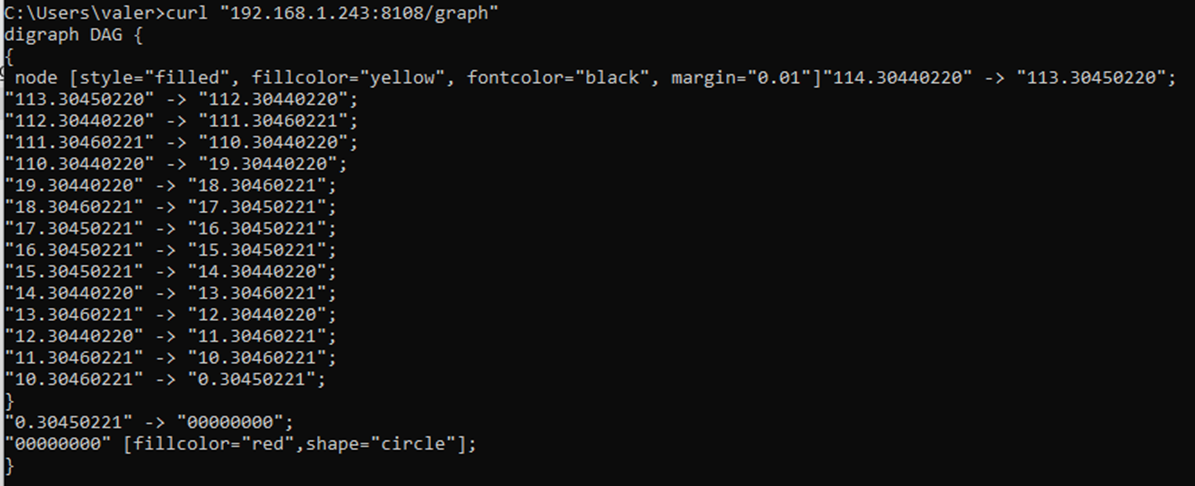
4.1.10 Graph
/graph
This call allows you to unload the current transaction graph (DAG) in dot format for further analysis and presentation. Converting a graph to a drawing can be done in the form of a sequence of commands (provided that dot is installed):
 curl "http://[NODE_IP]:8108/graph" > DAG.gv
dot -Tpng DAG.gv > dag.png
Example:
curl "192.168.1.243:8108/graph"